01
Primary & secondary schools
School years. Everyday progress.
Bring classes, term assessments, attendance and guardian updates into your school’s daily routine.
- Classes & terms
- Report cards
- Guardian access
Manage student records, lessons, attendance, school fees and results in one workspace. Give teachers, administrators and guardians access to the information they need.
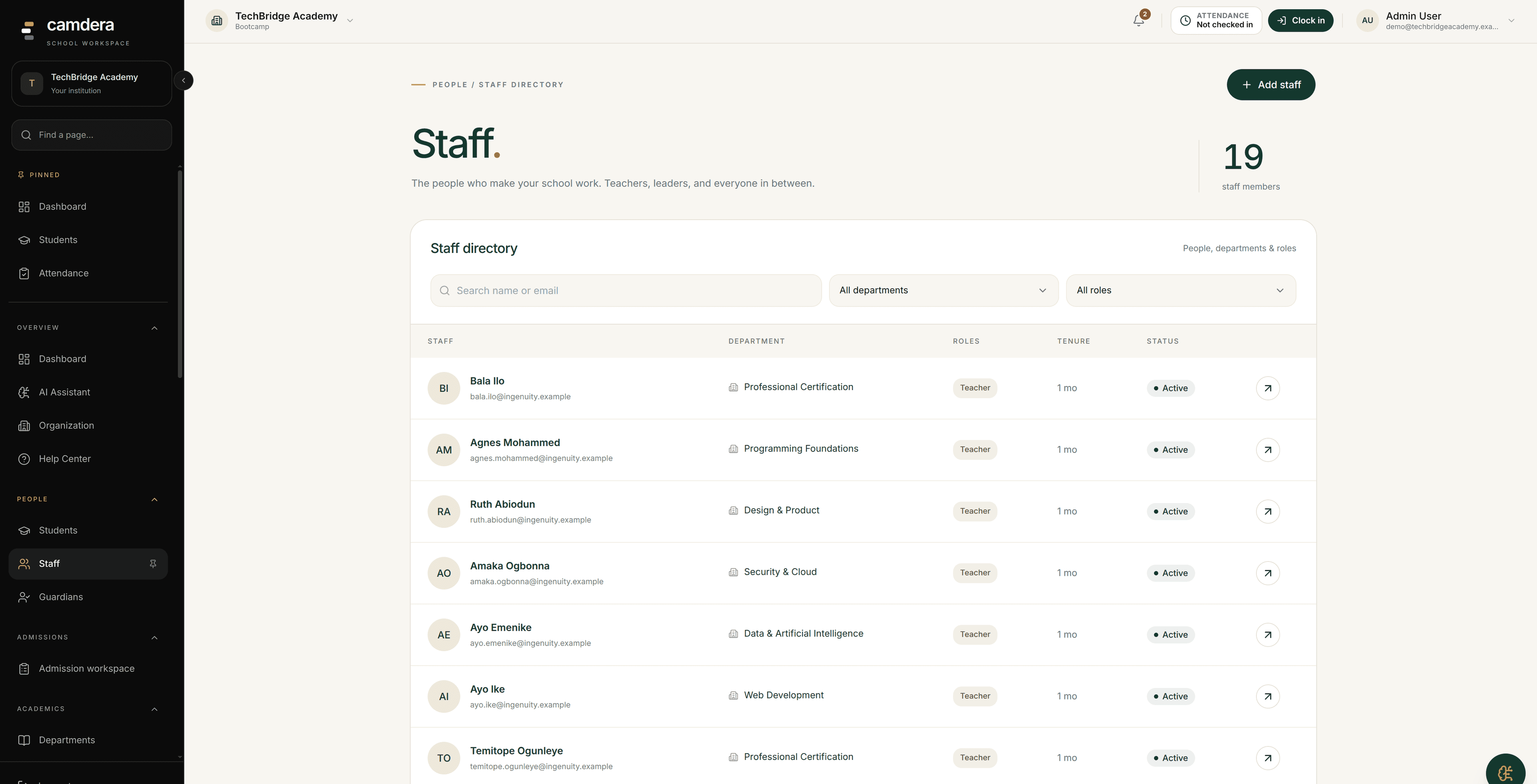
Actual Camdera Staff screen. Names and records shown are demo data. View full-size screenshot
DIFFERENT INSTITUTIONS. SHARED FOUNDATIONS.
A school term and a training cohort do not run the same way. Configure the academic structure, grading and access around how your institution works.
Primary & secondary schools
Bring classes, term assessments, attendance and guardian updates into your school’s daily routine.
Colleges, polytechnics & universities
Organize academic periods, departments, course offerings and learning materials around your institution’s structure.
Vocational schools & training centres
Give each cohort a place for lessons, assignments and assessments as learners work through their programme.
CONNECTED SCHOOL OPERATIONS
Keep each task in its academic context: the right student, class, term and course. Your teams work from connected records, with access shaped by their roles.
01 // ADMINISTRATOR
Create your session, terms, classes and course offerings. Add student records and link guardians before the first teaching day.
See the workflow02 // TEACHER
Use the class roster for attendance, share lesson materials, set assignments and record assessment scores.
See the workflow03 // BURSAR & SCHOOL LEADER
Review fee balances and check results before publishing. Guardians can follow the information released for their linked students.
See the workflowA CONNECTED SCHOOL WORKFLOW
A practical example to guide your pilot—not a customer case study or a prescribed national grading policy.
For a secondary-school example, create the 2026/2027 session, its three terms and JSS/SSS classes. Adapt the structure to your own institution.
Set up sessions and termsAdd students, assign their classes and link guardians. Assign course offerings and teachers before building the timetable.
Plan your student recordsConfigure the fee structure, inspect sample invoices and record receipts against the right students. Reconcile partial payments and opening balances.
Follow the bursary guideAn example policy might use 40 marks for continuous assessment and 60 for an exam. Configure your own approved weights, review scores and publish report cards.
Configure your grading scale03 // SYSTEM CAPABILITIES
Explore the academic, finance and communication tools your team can use. Every feature included on every tier.
Prepare question banks, schedule exams and review student attempts.
Organize admissions, enrolled students and your academic structure.
Configure assessment components, record scores and prepare report cards.
Create fee invoices, record receipts and review outstanding balances.
Organize teaching periods, check timetable conflicts and record attendance.
Strict permission-controlled interfaces tailored to each stakeholder.
Interactive course materials, assignments, and digital submissions per class.
Configure triggers and actions for recurring administrative tasks.
WORKSPACES BY RESPONSIBILITY
Explore the work each person can do. Staff access depends on the roles and permissions your institution assigns.
Students
Students use their portal for assigned learning, exams and available academic information.
Read the role guideEXAMPLE WORKFLOW
A student opens an assigned lesson, completes the work and checks the next scheduled assessment.
COMPUTER-BASED TESTING
Build question banks, schedule candidates and review attempts in the same workspace as your academic records. Supported objective questions can be marked automatically; written responses may need a teacher’s review.
Review wording, marks and answer keys. Compose mathematical expressions where needed.
Run a practice assessment on the devices and network your students will use.
Inspect submissions and resolve exam-day incidents before publishing results.
INTERACTIVE QUESTION EXAMPLE
A local demonstration—not a live exam screen. No answer is submitted or saved to your school.
SETTINGS & ACCESS
Configure academic periods, departments, courses and classes to reflect how your institution operates.
Learn moreAssign staff roles and permissions. Students and guardians use their own portals to reach the records made available to them.
Learn moreStart free, then explore fixed monthly or annual plans for your institution. View pricing and checkout availability for your billing currency.
Learn moreNeed a specific integration or deployment arrangement? Review supported integrations before planning your rollout.
ASSISTANCE & AUTOMATION
Use configured workflows for recurring tasks and the AI assistant for supported questions about your workspace. Review important outputs before acting on them.
Explore the assistantChoose a supported trigger, define the conditions and actions, and inspect workflow runs. Start with a test record before enabling an automation for your institution.
Read the automation guideUse the assistant to explore supported school information. AI responses can be incomplete or incorrect; verify figures in the relevant records and reports.
See how the assistant worksNo. Camdera uses fixed subscription plans for an institution, billed monthly or annually. Each plan includes student and staff capacity limits; those limits are not a per-student price.
Review the billing preview before confirming a change. Upgrades take effect immediately, with eligible unused payment applied to the new bill. Downgrades and billing-cycle changes are scheduled for the end of the paid period. Cancelling stops renewal; paid access remains until that period ends.
Yes. Schools in different countries can create a workspace and start on the Free plan. Pricing is shown in NGN or USD for your region. USD checkout is coming soon; contact us to discuss your setup and subscription needs.
Set up your academic structure, map your source fields and test a small sample first. Check the supported import workflow and reconcile student counts, guardian links and opening balances. Migration effort depends on your source data and requirements.
Yes. Prepare a practice assessment and test candidate access, devices and submission on your school’s network. The interactive question on this page is a local illustration, not a live exam or a proctoring system.
Try Camdera with up to 50 students on the Free plan. Choose a fixed monthly or annual subscription when you need more capacity. Have questions about plans or billing? Get in touch with our team.